Equalizer APO: A Free Audio Equalizer You Can Download for PC
Equalizer APO is a free audio equalizer for PC. See what it does, how to install the 32-bit or 64-bit version, and why beginners find it so easy to use.

Audio apps for sound systems are one of the technologies that make playing and producing music easier. With more and more of these apps appearing, Equalizer APO is one you can choose. Read on for the details.

A Quick Look at Equalizer APO
- What Is Equalizer APO?
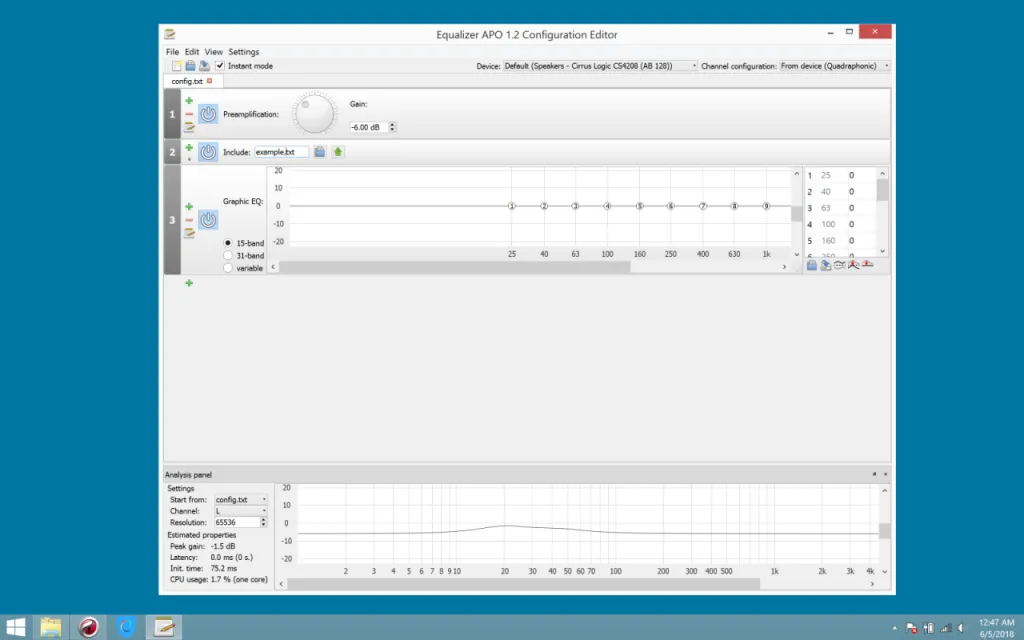
Equalizer APO is an app for audio and sound system needs. It is an audio equalizer, and a very simple one. It is easy to use and its user interface is light, which is an advantage for beginners. You can also download it online for free.
The app is also described as multiplatform, which makes it easy to improve audio quality by configuring the equalizer. As a result, this audio app can process three-dimensional sound and is very easy to use.
- Basic Steps to Get Started
To start, you can install the app from the file you downloaded. Note that it comes in two versions, 32-bit and 64-bit. Then run the .exe file and follow the instructions that appear on your computer screen.
Next, use the default path for the installation. A dialog box, configuration.exe, will appear. Here, make sure you choose the right audio device. If you pick the wrong one, you can change it later. When the installation is finished, you should restart your PC right away.
- Advantages of Equalizer APO
One advantage of this audio app is that it is free for good. Free equalizer apps are usually only trials, but with this one you can use it at no cost at all.
The app also gives a full view of your connectors, so you can see which devices will take part in the equalizing. If you want to change the equalizer's parameters, that is easy too. Just click the folder where the equalizer is installed, then open the TXT configuration file.
Another advantage is that it supports an unlimited number of filters. That makes it very useful for making sound or music come out more polished. To add a filter, though, you first have to type it into the configuration file.
Those are some of the advantages you get when you download this app. Besides being free, it is easy to use, so beginners can pick it up. Equalizer APO is also an app that delivers quick results without using excessive resources.